
Management software for Garmin devices
Garmin Express is a free utility tool developed by Garmin, a US-based company known for its smartwatches. Providing an all-in-one hub for managing your Garmin devices, this handy program allows for data syncing to Garmin Connect and updating for firmware and map data right from your fingers.
Top Recommended Alternative
Aimed at outdoor and fitness enthusiasts, Garmin Express promises a simple installation process that requires little technical expertise. Plus, you only need to register your device once to get started. Bear in mind, however, that this program requires a fast internet connection and at least 20 GB of free storage.
Map updates, voucher redemption, and many more
Garmin is one of the most trusted brands when it comes to robust and reliable GPS devices and fitness wearables. If you own multiple Garmin devices, it only makes sense to install Garmin Express. Not only does it support voucher redemption and content management and simplify software updates, it also provides timely map updates to ensure you can explore new points of interest without getting lost.
You can also save pre-routed directions for your destinations as well as get new CourseView golf course map updates. In addition, the app will let you back up your data and transfer your routes to another device if you need to switch and migrate to another model. All of these can be done using a USB cable to sync activity data.
Speaking of activity — once you have all this data — you can then sync it to your Garmin Connect mobile app. The overall user experience leaves a lot to be desired, though. Updating the program’s firmware is a hit-or-miss and syncing data does not always work. The same goes for downloading map data or transferring routes. The utility would often crash, too — a clear indication of the app’s poor technical performance.
Easily register or remove your Garmin device
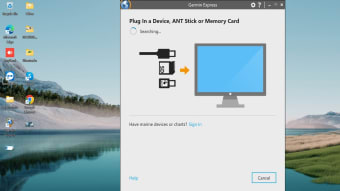
Just as it is easy to install Garmin Express, adding or removing a Garmin device from the program is also a straightforward, no-fuss process. To register a device, simply attach the Garmin charging cable to your device and computer. For cableless models, you can use a USB ANT+ Stick instead.
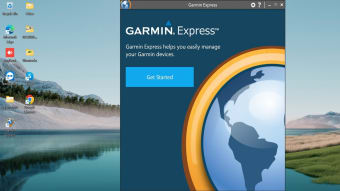
Upon launching the program, click “Get Started” and “+ Add A Device.” Also, ensure your device is in pairing mode if you own a cableless Garmin model. Then click “Add this Device” if the device has been successfully found. From here, you can choose either “Create an Account” or “Sign In”. Depending on the model, the account creation and sign-in process is skipped. Read and follow the instructions on the screen, and your device will be registered to the program.
To remove your device, click your model’s icon and choose “Tools & Content,” then click “Utilities” and “Remove from Express.”
Good on paper, bad in practice
Overall, Garmin Express makes it easy to manage multiple Garmin devices using a single, unified program, albeit with a hefty storage space requirement of at least 20 GB. The features are also handy for any one-the-go Garmin user. In practice, though, using it is less than ideal, given the frequent crashes and issues with data syncing, map updating, and route transferring — making it too inconsistent to rely on.